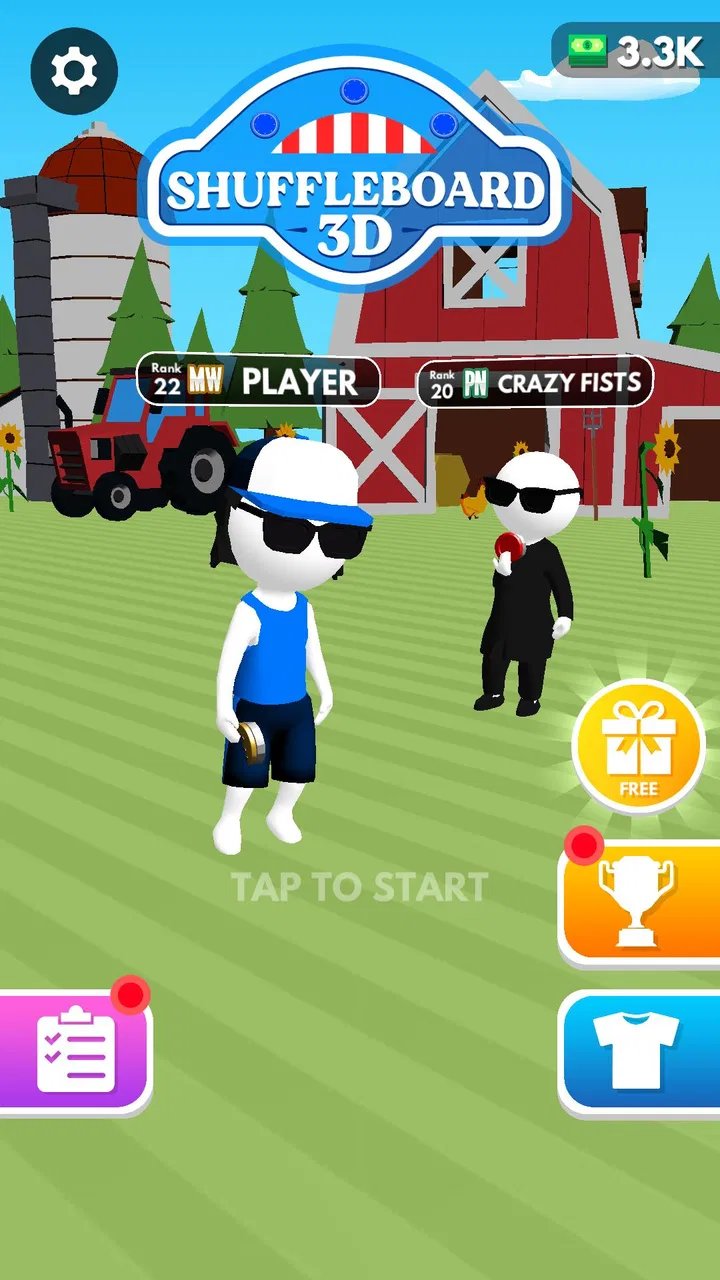
Shuffleboard Challenge
- 3.2
- Rating
- 1.00M
- Installs
- Free
- Price

 Analysis by App-foxy
I approached Shuffleboard Challenge as a quick sports game rather than a deep simulation, and that expectation shaped my experience. The basic appeal is easy to understand: you slide pucks toward a target, judge the force and direction, and try to arrange your pieces more intelligently than the opposing side. It is the kind of game I can open for a short break without needing a long tutorial or a complicated setup.
That simplicity is also where the game needs the most patience. A puck that looks perfectly aimed can finish in a disappointing position, while a softer shot may create a better tactical opportunity than a direct attempt. I found the most enjoyable moments came from treating each move as a small positioning problem instead of simply trying to send every puck as close to the scoring area as possible.
Getting into a match without unnecessary frustration
The game is a free sports title from Fun Games Teknoloji, aimed at Everyone and available for devices running Android 7.0 or later. Its current version is 1.2.6, and its straightforward presentation makes it approachable for casual players, including people who have never played physical shuffleboard. The short description is simply “Shuffleboard,” but the actual experience depends on learning how much control to use on every slide.
You May Also Like

 Google Keep - Notes and lists
Google Keep’s Quiet Growth Shows the Appeal of Simpler Notes
As mobile work gets busier, Google Keep keeps winning a simple contest: capture a thought quickly, find it later, and get on with the day.

 Blood Strike: 2.5 Anniversary
Blood Strike’s Loadouts Turn Every Drop Into a Tactical Gamble
A close look at Blood Strike’s custom loadouts: how fast access to signature weapons reshapes its battle royale rhythm, rewards preparation, and narrows the gap between fights.

 Pandora - Music & Podcasts
Pandora’s Music Is Easy to Start, but Harder to Recover
Pandora’s strength is its low-effort path from a seed to a station. Its weak spot is how much confidence it asks you to place in connection, setup, and quiet recovery.

 8 Ball Pool
 Is Built on Rivalries, Rematches, and Routine
A close look at the rivalries, rematches, shared routines, and unanswered safety questions that turn a quick pool match into a persistent mobile community.

 Samsung Music
’s Quiet Strength Is Playing What You Already Own
Its reach comes less from spectacle than from dependable access to a personal library. That simplicity is both the app’s strongest retention engine and its ceiling.

 AccuWeather: Weather Radar
AccuWeather Review: A Quick, Clear Forecast for Everyday Decisions
For everyday plans, the best forecast is the one you can understand quickly. AccuWeather makes rain timing, radar, and local conditions easy to act on, with a few trade-offs.
More From Our News Desk



One place where new players can get stuck is the difference between aiming and controlling momentum. Seeing the intended direction is only half of the decision. The strength of the swipe determines whether the puck stops safely, overshoots the useful area, or leaves a later shot awkwardly blocked. I recommend beginning with conservative movements. A cautious puck near the scoring zone is usually more valuable than a dramatic attempt that travels too far.
Another early mistake is focusing only on the nearest scoring position. The board can become crowded, and a puck placed slightly to the side may be more useful than one placed directly ahead. When I played with that in mind, I started using early turns to create options for later turns. This makes the game feel less like a reflex test and more like a compact tactical puzzle.
The free entry point is helpful for trying the core idea without committing money. There are in-app purchases ranging from $1.99 to $29.99 per item, so anyone who dislikes optional spending should check the purchase flow carefully before handing the device to a child. The Everyone rating makes the game broadly suitable from a content perspective, but age suitability does not automatically remove the need for sensible purchase supervision.
Small control habits that make a noticeable difference
I found three habits especially useful. First, I stopped making every shot at maximum strength. Strong slides are tempting, but they reduce the margin for error and can turn a promising position into a wasted turn. Second, I watched the remaining open space before moving a puck. A clear lane is often more important than a slightly better angle. Third, I used defensive placement when the opponent or board position made an aggressive shot too risky.
These are not hidden modes or special abilities; they are ways of reading the central mechanic more effectively. The store summary emphasizes strategic puck arrangement, and that is the part worth taking seriously. The game rewards players who think one move ahead, even though each individual action looks simple.
For a realistic everyday scenario, imagine having a few minutes while waiting for a train or taking a break between tasks. This works well when you want a focused activity that can be understood immediately. I would not choose it for a long group session unless everyone enjoys repeating short board challenges, but it fits the role of a compact time-filler better than a demanding sports simulation.
Checks to make before blaming the game
If the game does not behave as expected, I would start with basic device checks rather than immediately assuming the installation is broken. Confirm that the phone or tablet meets the Android requirement, close other demanding applications, and reopen the game. A device that is low on free space or struggling with many background processes can make any touch-based title feel less responsive.
Touch control is particularly sensitive to how the screen is being used. A dirty display, a thick screen protector, damp fingers, or an accidental edge touch can all make a swipe feel inconsistent. I found it useful to hold the device steadily, begin the gesture on a clear part of the play area, and avoid dragging from the very edge of the screen. That does not change the game’s rules, but it can remove a surprising amount of apparent control trouble.
Players should also distinguish between a missed shot and a failed input. If the puck moves but finishes in the wrong place, the game has probably registered the gesture and the issue is more likely timing, direction, or force. If nothing happens at all, repeating the same movement immediately may not help. A deliberate restart of the attempt, followed by a slower swipe from a clear location, is a better first test.
Installation and update problems deserve the same practical approach. I would use the official app store route, verify that the device has a stable connection, and make sure there is enough storage for the update process. If an update appears stuck, restarting the device and trying again later is safer than repeatedly tapping through screens. Because the game is already on version 1.2.6, keeping the installed copy current is sensible when troubleshooting compatibility or performance.
Network conditions can also confuse the diagnosis. If a screen takes longer to load or a purchase-related page does not respond, I would test the connection with another app before deciding that the game itself is at fault. Switching between a reliable Wi-Fi connection and mobile data, when available, can reveal whether the problem is local to the network. I would avoid repeated purchase attempts until the first transaction’s status is clear.
Recovering a session after a poor turn
A bad shot does not necessarily ruin a match. My first instinct used to be to chase the lost position with an even stronger move, but that usually created another problem. A better recovery is to reassess the board: identify which puck is still useful, find the safest open route, and use the next turn to rebuild control. This approach is especially important for players who tend to equate a strong move with a fast move.
When a puck lands in an awkward place, I look for its effect on the remaining lanes. Sometimes it can act as a barrier, forcing a different route and making a later placement more predictable. At other times it blocks my own best option, in which case a gentle repositioning attempt is preferable to a risky direct shot. Thinking in terms of board shape helped me recover from mistakes without treating every failed turn as a restart signal.
If the application closes or a session seems to reset, I would first relaunch it and check whether the problem happens consistently or only once. Then I would restart the device and confirm that other applications are not consuming excessive memory. I would not clear app storage as an opening move, because that can remove local progress or settings in games that store information on the device. More destructive troubleshooting should come only after simpler checks have failed.
The same caution applies to reinstalling. Reinstallation can help with damaged local files, but it can also erase locally stored information if the game does not restore it automatically. Before taking that step, I would make sure I am comfortable losing the current session and would confirm that the app store account is the one I normally use. This is a general recovery precaution, not a claim that every player will encounter data loss.
Purchase recovery deserves extra care. If an item appears not to arrive, I would avoid buying it again immediately. I would close and reopen the game, check the account and store transaction history, and allow time for the original transaction to process. If the charge is present but the item remains unavailable, the appropriate next step is store or developer support rather than repeated tapping. This is one of the few situations where patience is more useful than experimentation.
When the game is not the real source of the problem
Not every disappointing result comes from poor controls or a technical fault. Shuffleboard depends on interpreting a visual surface, and display brightness, glare, and viewing angle can affect how confidently I judge a shot. On a bright commute, I found it harder to read small positional differences than in a quiet indoor setting. Adjusting the screen and holding the device at a comfortable angle can improve play without changing any game setting.
Performance can also be affected by the phone itself. Older hardware may handle a simple board game adequately most of the time but still show occasional delays when the system is busy. If the game feels sluggish, I would close video, social, and browser apps first, then try again with the device cooler and less loaded. A battery-saving mode may also change how responsive a device feels, so testing briefly with normal performance settings can help identify the source.
It is worth separating personal preference from a genuine defect. Someone expecting a full sports career, detailed player progression, or a realistic physical simulation may find this game too limited even when it works correctly. Its strength is the short, focused puck challenge. If you want a broad sports package with teams, seasons, or extensive customization, a larger sports title will probably be a better fit. Choosing the right type of game prevents disappointment that no troubleshooting can solve.
The audience size gives some context: the game has passed one million installs, while its average rating is 3.2 from around 3.9 thousand ratings and 714 reviews. I read that combination as a sign of a recognizable but uneven casual experience rather than a universally polished favorite. The install count suggests that the concept has found an audience, but the modest average rating is a useful reminder to keep expectations realistic.
How it compares with familiar alternatives
Compared with playing shuffleboard in person, this version is more convenient and less social. There is no need for a table, equipment, or a group, and a quick match can be started almost anywhere. The trade-off is that a touchscreen cannot reproduce the feel of a physical puck or the atmosphere of playing across a real table. For practicing the idea of controlled placement, the app is convenient; for the social experience, the real-world alternative remains stronger.
Compared with larger mobile sports games, it is much easier to understand and less demanding of your time. You do not need to learn a roster, memorize complex controls, or manage a long campaign before enjoying the central action. The downside is limited breadth. Players who need constant unlocks, numerous modes, or a deep progression system may run out of reasons to return sooner than casual players who enjoy improving their shot judgment.
It also differs from pure arcade games that reward immediate reactions. Here, slowing down can be the smarter choice. That makes it suitable for people who like turn-based thinking disguised as a sports activity. It is less suitable for anyone looking for rapid action, elaborate presentation, or a game that can be played almost entirely on instinct.
Who should install it, and who should skip it
I would recommend trying it if you want a free, accessible sports game built around short decisions and simple touch control. It is a reasonable choice for casual players, beginners curious about shuffleboard, and anyone who enjoys finding better angles through repetition. The Everyone rating also makes it broadly approachable, although purchase supervision is still sensible because optional items are available.
I would skip it if your priority is a realistic simulation, a substantial multiplayer community, or a long-term sports management experience. I would also be cautious if you dislike games where small differences in swipe strength can change the result. That sensitivity is part of the challenge, but it can feel imprecise to players who prefer clearly predictable controls.
My practical advice is to play the first few sessions slowly, use moderate force, and judge success by board position rather than by the excitement of a powerful slide. If the game feels unresponsive, test the display and device conditions before changing or reinstalling anything. If the basic puck mechanic does not appeal after a handful of attempts, a different sports game will serve you better than trying to force enjoyment from this one.
Overall, Shuffleboard Challenge is a modest but approachable sports game with a clear central idea. I like it most as a short tactical diversion, especially when I want something more thoughtful than a reflex arcade title but less involved than a full sports simulation. Its free price makes experimentation easy, while the optional purchases and middling average rating are reasons to keep expectations and spending under control.
My final view is positive but measured: install it for the compact puck-placement challenge, not for a complete virtual sports world. When the controls respond properly and I approach each turn with restraint, it offers satisfying little decisions. When I want depth, social play, or a highly realistic physical experience, I reach for another option. For the right kind of break, though, this game earns a place on the device.
FAQs for Shuffleboard Challenge
01What is Shuffleboard Challenge and how does it work?
Shuffleboard Challenge is a mobile game that brings the classic tabletop game of shuffleboard to your device. Players slide pucks down a narrow table, aiming to land them in scoring zones while avoiding hazards. The game offers multiple levels, challenges, and multiplayer modes, providing a realistic shuffleboard experience with intuitive swipe controls.
02Is Shuffleboard Challenge available for both Android and iOS devices?
Yes, Shuffleboard Challenge is available for download on both Android and iOS platforms. You can find it on the Google Play Store for Android devices and the Apple App Store for iOS devices. Ensure your device meets the minimum system requirements for optimal performance.
03Does Shuffleboard Challenge offer multiplayer options?
Shuffleboard Challenge includes both single-player and multiplayer modes. You can compete against AI opponents in various difficulty levels or challenge your friends in real-time through online multiplayer. The game also supports local multiplayer, allowing you to play against someone on the same device.
04Are there in-app purchases in Shuffleboard Challenge?
Shuffleboard Challenge offers in-app purchases that enhance the gaming experience. Players can buy cosmetic items, additional levels, or power-ups to improve their gameplay. While the game is free to download, these optional purchases can provide extra content and customization options.
05What are the main features and challenges in Shuffleboard Challenge?
Shuffleboard Challenge boasts a variety of features, including realistic physics, multiple game modes, and a range of challenging levels. Players can experience different table designs and environments, each with unique obstacles. The game also includes a leaderboard system to track and compare scores with players worldwide.
Pros
- Engaging gameplay with realistic physics.
- Intuitive controls for easy navigation.
- Multiplayer mode for competitive fun.
- Regular updates with new features.
- Visually appealing graphics.
Cons
- Limited customization options for players.
- Occasional in-app ads can be intrusive.
- Requires stable internet for multiplayer.
- Some levels can be too challenging.
- In-app purchases may be necessary.

Shuffleboard Challenge
Gallery